When activating the “Disable the built-in file editors” feature under Settings -> Hardening in Really Simple Security, you might receive a notice that “the DISALLOW_FILE_EDIT constant is defined and set to false” as shown in the below image.

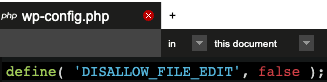
This means that DISALLOW_FILE_EDIT has been defined in the wp-config.php with a false value, and Really Simple Security cannot override this while that is the case. The solution is to remove the following line from your wp-config.php file:
define( 'DISALLOW_FILE_EDIT', false );

After doing so, the plugin will add the correct line to wp-config.php that disables the built-in File Editors.